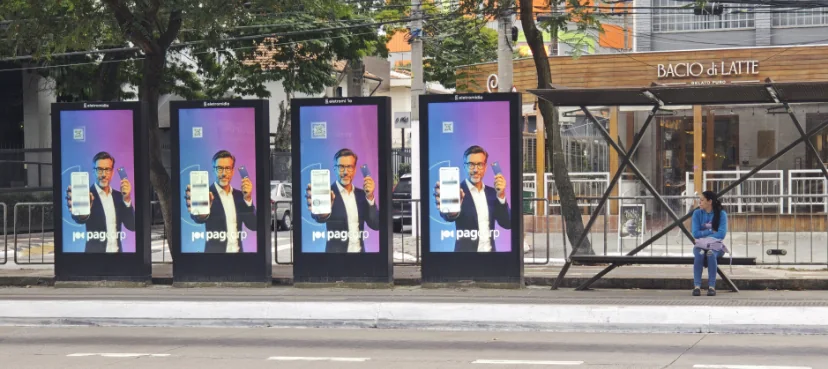
Start with the passenger viewing task
A bus stop display can show route information, service changes, advertising or a combination of content. The intended viewing distance, passenger flow, glare direction, viewing height and accessibility needs should guide screen size and orientation. Separate essential passenger information from paid advertising so the hierarchy remains clear in a short glance.
The site survey should identify the approach direction, sun exposure throughout the day, shelter geometry, vandalism risk, nearby lighting, power availability and the route for maintenance staff. A display specification made before these details are known can leave the project with an unsuitable mount or inaccessible service side.
Coordinate screen enclosure and site works
The supplied outdoor product datasheet lists IP65 protection, a 6 mm tempered anti-glare glass front, thermostat-controlled fan cooling and an operating temperature range of -30 C to +50 C. These are datasheet claims for the covered outdoor product family; confirm the exact model and configuration for the project and local conditions.
Floor-standing models require civil coordination. The supplied installation reference calls for a concrete foundation, embedded stainless anchor bolts, advance cable routing with a specified exposed length, level adjustment and lifting arrangements for large formats. Those points should be translated into project drawings and verified by the local contractor before the base is poured. Wall-mounted units need a separate review of the wall structure, anchors, wind loading and maintenance route.
Plan service access and content responsibility
A transport project may involve the display supplier, operator, CMS provider, network contractor, electrical contractor and civil works team. Create a responsibility matrix for content playback, remote monitoring, network access, restart behavior, power isolation, spare parts and field service. This avoids commissioning disputes when the display hardware is ready but the control network is not.
Confirm whether the display includes a standard Android system or needs a Windows PC option, which the datasheet lists for the outdoor family. Verify Ethernet, WiFi or optional 4G availability for each model. Cybersecurity requirements, SIM plans, CMS licensing and cellular coverage are project-specific and should be agreed with the operator.
Tender and acceptance checklist
A useful tender package includes display model and screen size, luminance option, resolution, viewing orientation, glass, IP rating, operating range, cooling, power input, mounting drawings, cable entry, service access, lifting points, packing, warranty and acceptance tests. Define what will be checked at factory release and at site handover.
For a repeat network, define approved model variants and a consistent set of drawings, labels and commissioning records. This helps contractors replace or expand a route without reopening every mechanical and electrical decision. The final procurement specification should distinguish supplied hardware from civil works, local network equipment, CMS and installation labor.
Product recommendation
Use a wall-mounted model when the shelter or existing structure provides a verified mounting surface and accessible maintenance path. Use a floor-standing model when the project requires an independent totem, while coordinating its foundation and cable route early. Send the site plan, photos, country, quantity and screen dimensions for a model-level review.
Coordinate the operating model across a route
A public transport display is often part of a wider passenger-information service. The operator should decide which party owns the timetable feed, emergency notices, advertising approval and display-health monitoring. Define what happens when the network is unavailable: whether a local fallback message is required, who can update it and how the unit returns to normal service. These are control-system decisions and should not be assumed to be included with the display hardware.
For multiple stops, group sites by shelter type, exposure, mounting method and access constraints. Create an approved configuration for each group, including the drawing revision, model code, cable entry, door clearance and service procedure. This reduces variation for installation crews and helps the operator compare replacement requests with the original bill of materials. Include unique asset labels in the project documentation without exposing network credentials on the enclosure.
Before handover, test the display at its installed angle and from the passenger approach, not only from directly in front. Confirm that key information remains legible, that the unit can be isolated safely for maintenance, and that doors can open without obstructing the pavement or passenger flow. Record site photos, model details, serial numbers and any deviations from the approved drawing.
Build a maintenance and resilience plan
Public-space equipment needs an agreed response when a screen is damaged, loses power or becomes unreadable. Set an escalation route, define which party can isolate the unit, and specify the information required for a service ticket. Operators should agree how to display a safe fallback state and how quickly advertising or passenger content can be restored after a repair. The display specification alone does not define a network service-level agreement.
Review how technicians reach the screen without creating a hazard for passengers or traffic. Include access windows, traffic management, lifting equipment, replacement-unit storage and the process for documenting removed parts. Where a route contains many models, keep an asset register with location, model, serial number, drawing revision and installation date. This turns maintenance from guesswork into a repeatable workflow and gives buyers a more realistic view of lifecycle support.